TrademarkTrademark
Services
Learn
Company
IQON App
March 10·Updated March 10

VPN Split Tunneling Explained

TL;DR
Split tunneling lets you choose what uses the VPN and what uses your normal internet connection. You can route traffic by app, IP address, or domain name. In include mode, only the selected traffic goes through the VPN. In exclude mode, everything uses the VPN except the traffic you leave out. The IQON app also has per-game presets that automatically send only the game’s traffic through the VPN.
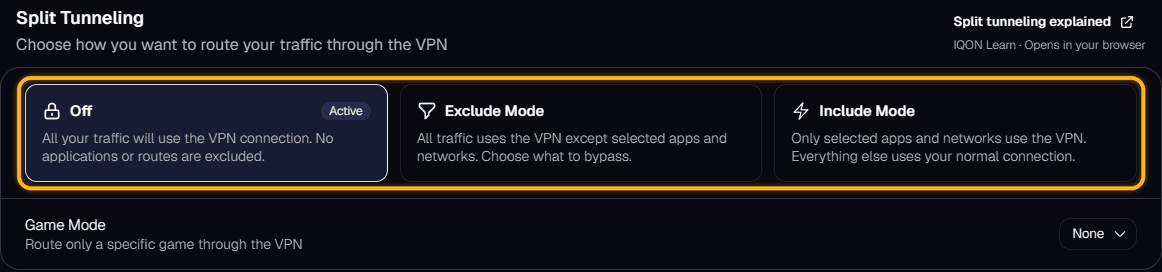
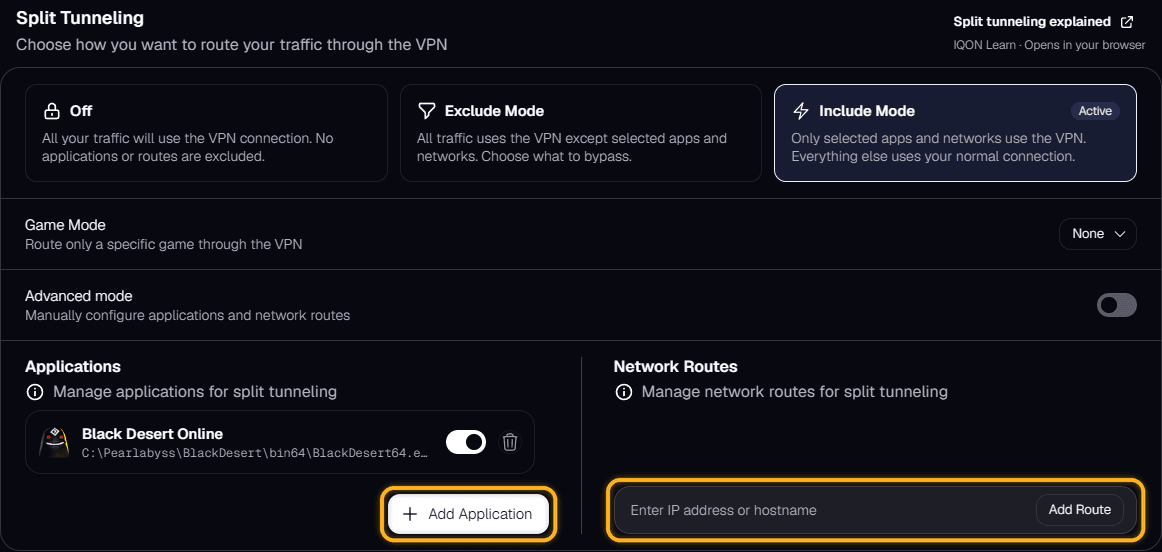
VPN split tunneling lets you choose which traffic goes through the VPN and which traffic uses your normal internet connection. Instead of sending everything through the VPN, split tunneling gives you more control over what stays protected or routed through another location and what goes out normally.Split tunneling can work in three main ways: app routes, IP routes, and domain routes.App routes let you choose specific apps that should use the VPN. For example, you can send a game through the VPN while keeping your browser, chat apps, or streaming services on your normal connection. This is usually the easiest option for most people because it works at the app level.IP routes let you choose specific IP addresses that should use the VPN. IP addresses are the numeric addresses used by servers and online services. This option is more technical, but it can be useful when you want to route traffic to specific servers through the VPN.Domain routes let you choose specific domain names, such as websites or service addresses, that should use the VPN. This can be easier to manage than IP routes because domain names are more recognizable, but it still depends on how the app or service connects behind the scenes.Split tunneling usually works in one of two modes: Include mode or Exclude mode.In Include mode, only the apps, IPs, or domains you select will use the VPN. Everything else uses your normal internet connection. This is useful when you only want the VPN to affect a specific app, game, or service.In Exclude mode, all traffic uses the VPN except the apps, IPs, or domains you choose to leave out. This is useful when you want most of your traffic protected by the VPN but need certain services to bypass it.Per-game presets make split tunneling easier by automatically routing only a supported game’s traffic through the VPN tunnel. This means the game uses the VPN while other apps and services on your device continue using your normal connection. It removes the need to manually set up app, IP, or domain rules for supported games.