TrademarkTrademark
Services
En savoir plus
Entreprise
IQON App
March 10·Updated October 8

VPN Split Tunneling Explained

TL;DR
Split tunneling lets you choose which traffic uses the VPN and which uses your normal connection. You can route traffic by app, IP address, or domain. In Include mode, only the traffic you select uses the VPN. In Exclude mode, everything uses the VPN except what you leave out. IQON's VPN Game Mode sets this up for a single game.
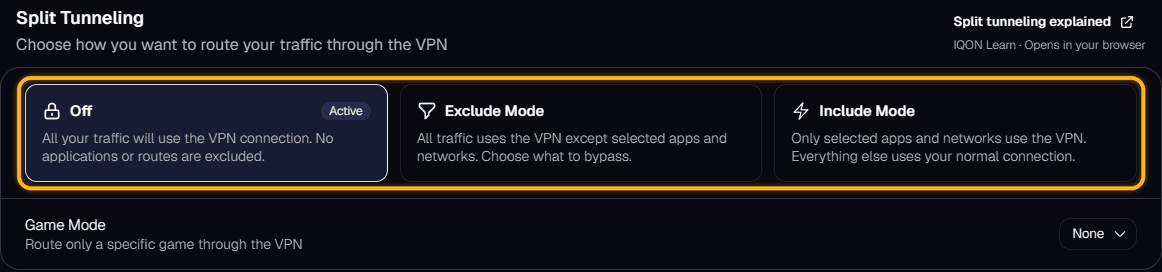
VPN split tunneling lets you choose which traffic goes through the VPN and which uses your normal internet connection. You decide what gets routed through the VPN server and what goes out directly.There are three common ways to choose traffic: by app, by IP address, and by domain.App routes send specific apps through the VPN. For example, you can send a game through the VPN while your browser, chat apps, and streaming services stay on your normal connection. This is the easiest option for most people.IP routes send traffic for specific IP addresses through the VPN. An IP address is the numeric address of a server or online service. This option is more technical, but it helps when you want to reach particular servers through the VPN.Domain routes send traffic for specific domain names, such as a website or service address, through the VPN. Domain names are easier to recognize than IP addresses, but whether this works depends on how the app or service connects.Split tunneling usually works in one of two modes. In IQON, you choose between Off, Exclude Mode, and Include Mode under Settings > VPN > Split Tunneling.
IQON Settings VPN Split Tunneling section with the Off, Exclude Mode, and Include Mode options highlighted.
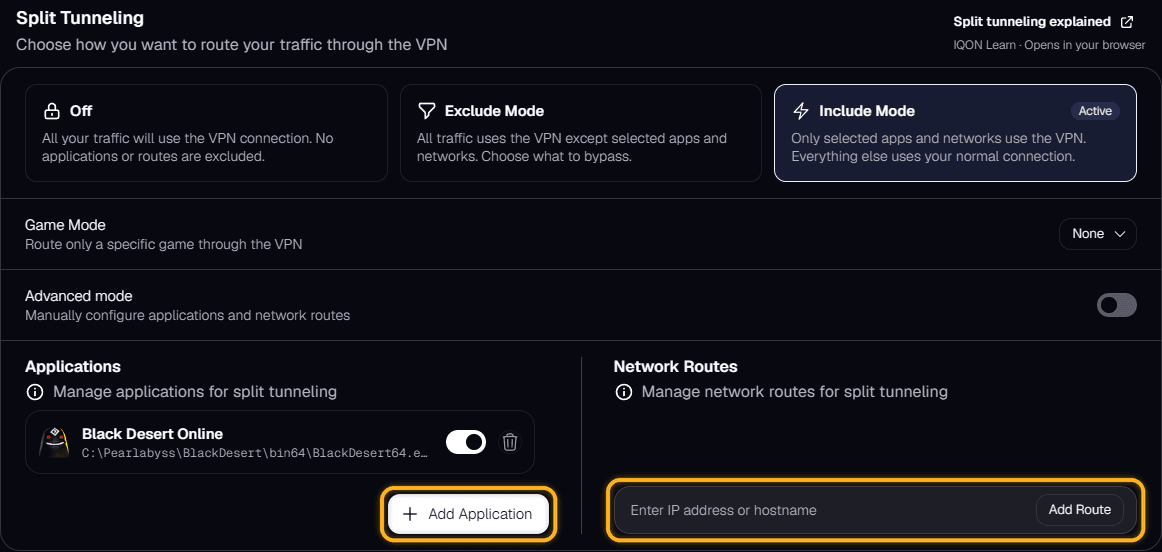
In Include mode, only the apps, IP addresses, or domains you select use the VPN. Everything else uses your normal connection. Use it when you only want the VPN to affect one app, game, or service.In Exclude mode, everything uses the VPN except the apps, IP addresses, or domains you leave out. Use it when you want most of your traffic on the VPN but need some services to bypass it.When you choose Include Mode or Exclude Mode, IQON shows two lists. Select "Add Application" to add an app, or type an IP address or hostname under Network Routes and select "Add Route". Each app has a switch, so you can turn it off without removing it from the list.
IQON Split Tunneling in Include Mode with Add Application and the network route field highlighted.
IQON's VPN Game Mode sets up Include mode for a single game, so only that game uses the VPN and everything else stays on your normal connection. You don't have to add app, IP, or domain rules yourself. See VPN Game Mode to learn how to turn it on.